仕事では、エラー画面を撮ってGitHub Copilotに貼り付け、「この画面から原因を分析・解説して」と聞くことがよくあります。状況を文章で説明し直す手間が減るので、自宅でも同じように使いたくなりました。
ところが、自宅のWezTermからWSL2で開いたAntigravity CLI(agy 1.5.15)では、Ctrl+V を押しても画像が付きませんでした。そこで、Windowsのクリップボードを読んでPNGを返すC#ヘルパーを作り、WSL2から wl-paste として呼び出す形にしました。WezTermから agy を直接起動した検証では、入力欄にPNGを添付できました。
Ctrl+V を押しても画像が付かなかった
Antigravity CLIの公式ガイドでは、入力欄の Ctrl+V で画像を添付できます。私のWSL2では wl-paste が入っておらず、Windowsでスクリーンショットをコピーした直後に xclip -selection clipboard -t TARGETS -o を実行しても、画像形式は一覧に出ませんでした。
普段はWezTerm → WSL2 → Herdrで作業しています。今回は画像の取得経路を確認するため、掲載画面を撮るときはWezTermのWSL2シェルから agy を直接起動しました。
最初は wl-paste の中からPowerShellを起動し、Add-Type でクリップボードを読む方式を試しました。コマンド単体ではPNGを取得できましたが、agy の入力欄で Ctrl+V を押すと signal: killed と表示され、画像は付きませんでした。そこで、手元のWindows 11に入っていた .NET Frameworkの csc.exe で、クリップボードを読むプログラムを先にビルドする方式に変えました。
C#ヘルパーと wl-paste を用意する
掲載手順は2026年11月27日にWindows 11 x64、WSL2のUbuntu 24.04、Antigravity CLI 1.5.18で再確認しました。WSLg上で通常の wl-clipboard が使えるなら、まずコピーした画像が wl-paste --list-types に出るか確認できます。私の環境では sudo を使わず、Windowsのクリップボードを直接読む方法を選びました。
ここで使うラッパーが返すのはPNG画像だけです。標準の wl-paste と同じ名前を使うので、専用のディレクトリに置き、起動コマンドで指定した agy とその子プロセスにだけ優先させます。
1. Windows側で動くヘルパーをビルドする
WSL2のシェルで保存先を作り、下のC#コードを ~/.local/share/agy-win-clipboard/WinWlPaste.cs に保存します。
mkdir -p "$HOME/.local/share/agy-win-clipboard/bin"
C#側は Windows Formsの Clipboard.GetImage() で画像を読み、PNGに変換して標準出力へ書き出します。このラッパーから使うのは list と image の2モードです。
WinWlPaste.cs の全文
using System;
using System.Collections.Generic;
using System.Collections.Specialized;
using System.Drawing;
using System.Drawing.Imaging;
using System.IO;
using System.Runtime.InteropServices;
using System.Text;
using System.Text.RegularExpressions;
using System.Threading;
using System.Windows.Forms;

namespace WinWlPaste
{
    internal static class Program
    {
        private static readonly Encoding Utf8NoBom = new UTF8Encoding(false);

        [STAThread]
        private static int Main(string[] args)
        {
            string mode = "auto";
            bool noNewline = false;

            for (int i = 0; i < args.Length; i++)
            {
                string arg = args[i];
                if (arg == "--no-newline" || arg == "-n")
                {
                    noNewline = true;
                }
                else if (arg == "list" || arg == "image" || arg == "uri" || arg == "text" || arg == "auto")
                {
                    mode = arg;
                }
                else
                {
                    WriteError("win-wl-paste: unknown argument: " + arg);
                    return 1;
                }
            }

            const int maxAttempts = 5;
            for (int attempt = 1; attempt <= maxAttempts; attempt++)
            {
                try
                {
                    return Execute(mode, noNewline);
                }
                catch (ExternalException ex)
                {
                    if (attempt == maxAttempts)
                    {
                        WriteError("win-wl-paste: clipboard busy: " + ex.Message);
                        return 1;
                    }
                    Thread.Sleep(20);
                }
                catch (Exception ex)
                {
                    WriteError("win-wl-paste: " + ex.Message);
                    return 1;
                }
            }

            return 1;
        }

        private static int Execute(string mode, bool noNewline)
        {
            switch (mode)
            {
                case "list":
                    return HandleList();
                case "image":
                    return HandleImage();
                case "uri":
                    return HandleUri();
                case "text":
                    return HandleText(noNewline);
                case "auto":
                    if (Clipboard.ContainsText())
                    {
                        return HandleText(noNewline);
                    }
                    if (Clipboard.ContainsImage())
                    {
                        return HandleImage();
                    }
                    if (Clipboard.ContainsFileDropList())
                    {
                        return HandleUri();
                    }
                    return 2;
                default:
                    return 1;
            }
        }

        private static int HandleList()
        {
            List<string> types = new List<string>();
            if (Clipboard.ContainsFileDropList())
            {
                StringCollection files = Clipboard.GetFileDropList();
                if (files != null && files.Count > 0)
                {
                    types.Add("text/uri-list");
                }
            }
            if (Clipboard.ContainsImage())
            {
                types.Add("image/png");
            }
            if (Clipboard.ContainsText())
            {
                types.Add("text/plain;charset=utf-8");
                types.Add("text/plain");
            }

            if (types.Count == 0)
            {
                return 2;
            }

            WriteUtf8(string.Join("\n", types.ToArray()) + "\n");
            return 0;
        }

        private static int HandleImage()
        {
            using (Image img = Clipboard.GetImage())
            {
                if (img == null)
                {
                    return 2;
                }

                using (MemoryStream ms = new MemoryStream())
                {
                    img.Save(ms, ImageFormat.Png);
                    byte[] bytes = ms.ToArray();
                    Stream stdout = Console.OpenStandardOutput();
                    stdout.Write(bytes, 0, bytes.Length);
                    stdout.Flush();
                }
            }
            return 0;
        }

        private static int HandleUri()
        {
            StringCollection files = Clipboard.GetFileDropList();
            if (files == null || files.Count == 0)
            {
                return 2;
            }

            StringBuilder sb = new StringBuilder();
            foreach (string path in files)
            {
                if (string.IsNullOrEmpty(path))
                {
                    continue;
                }
                sb.Append(ToWslFileUri(path));
                sb.Append('\n');
            }

            if (sb.Length == 0)
            {
                return 2;
            }

            WriteUtf8(sb.ToString());
            return 0;
        }

        private static int HandleText(bool noNewline)
        {
            if (!Clipboard.ContainsText())
            {
                return 2;
            }

            string text = Clipboard.GetText(TextDataFormat.UnicodeText);
            if (text == null)
            {
                return 2;
            }

            text = text.Replace("\r\n", "\n");
            if (!noNewline && !text.EndsWith("\n", StringComparison.Ordinal))
            {
                text += "\n";
            }

            WriteUtf8(text);
            return 0;
        }

        private static string ToWslFileUri(string winPath)
        {
            Match driveMatch = Regex.Match(winPath, @"^([A-Za-z]):\\?(.*)$");
            if (driveMatch.Success)
            {
                string drive = driveMatch.Groups[1].Value.ToLowerInvariant();
                string rest = driveMatch.Groups[2].Value;
                string encoded = EncodePathSegments(rest);
                return string.IsNullOrEmpty(encoded)
                    ? "file:///mnt/" + drive + "/"
                    : "file:///mnt/" + drive + "/" + encoded;
            }

            Match wslMatch = Regex.Match(winPath, @"^\\\\(?:wsl\.localhost|wsl\$)\\[^\\]+\\?(.*)$", RegexOptions.IgnoreCase);
            if (wslMatch.Success)
            {
                string encoded = EncodePathSegments(wslMatch.Groups[1].Value);
                return "file:///" + encoded;
            }

            Match uncMatch = Regex.Match(winPath, @"^\\\\(.+)$");
            if (uncMatch.Success)
            {
                return "file://" + EncodePathSegments(uncMatch.Groups[1].Value);
            }

            return "file:///" + EncodePathSegments(winPath);
        }

        private static string EncodePathSegments(string rawPath)
        {
            if (string.IsNullOrEmpty(rawPath))
            {
                return string.Empty;
            }

            string[] parts = rawPath.Split(new[] { '\\', '/' }, StringSplitOptions.RemoveEmptyEntries);
            for (int i = 0; i < parts.Length; i++)
            {
                parts[i] = Uri.EscapeDataString(parts[i]);
            }
            return string.Join("/", parts);
        }

        private static void WriteUtf8(string text)
        {
            byte[] bytes = Utf8NoBom.GetBytes(text);
            Stream stdout = Console.OpenStandardOutput();
            stdout.Write(bytes, 0, bytes.Length);
            stdout.Flush();
        }

        private static void WriteError(string message)
        {
            byte[] bytes = Utf8NoBom.GetBytes(message + "\n");
            Stream stderr = Console.OpenStandardError();
            stderr.Write(bytes, 0, bytes.Length);
            stderr.Flush();
        }
    }
}
続けて、下のコマンドをWSL2で実行します。Windows 11に含まれる .NET Framework のうち、手元では Framework64 以下の csc.exe を使いました。Windows側のユーザープロファイルが C:\Users にあり、WSL2から /mnt/c にアクセスできる構成が前提です。WindowsとWSL2でユーザー名が異なる場合は、最初の行の $USER をWindows側のユーザー名に変えてください。
export WIN_USER="$USER"
(
  set -eu
  win_dir="/mnt/c/Users/$WIN_USER/.local/share/agy-win-clipboard"
  source_file="$HOME/.local/share/agy-win-clipboard/WinWlPaste.cs"
  compiler=/mnt/c/Windows/Microsoft.NET/Framework64/v4.0.30319/csc.exe
  exe="$win_dir/win-wl-paste.exe"

  if [[ ! -f "$compiler" ]]; then
    printf '%s\n' 'csc.exe が見つかりません。Windows側のパスを確認してください。' >&2
    exit 1
  fi
  if [[ -e "$exe" || -L "$exe" ]]; then
    printf '既存のファイルを別の場所に移してから実行してください: %s\n' "$exe" >&2
    exit 1
  fi

  mkdir -p -- "$win_dir"
  build_dir=$(mktemp -d "$win_dir/build.XXXXXX")
  trap 'rm -rf -- "$build_dir"' EXIT
  cp -- "$source_file" "$build_dir/WinWlPaste.cs"

  if [[ -n "${WSL_INTEROP:-}" && ! -S "$WSL_INTEROP" ]]; then
    unset WSL_INTEROP
  fi
  cd -- "$build_dir"
  /init "$compiler" csc.exe /nologo /optimize+ /target:exe /platform:x64 \
    /out:win-wl-paste.exe /r:System.Windows.Forms.dll /r:System.Drawing.dll \
    WinWlPaste.cs < /dev/null

  test -s win-wl-paste.exe
  mv -nT -- win-wl-paste.exe "$exe"
  if [[ -e win-wl-paste.exe ]]; then
    printf '配置先に既存のファイルがあります: %s\n' "$exe" >&2
    exit 1
  fi
  printf 'ビルド完了: %s\n' "$exe"
)
ビルド完了 が出たら次へ進みます。ビルドはWindows側の一時ディレクトリで行い、成功したEXEだけを配置します。
手元では、Neovimからブラウザを開くときと同じように、WSL2で .exe を直接実行すると Exec format error が出ることがありました。ここでは WSLの /init 経由で起動します。指定先のソケットが消えているときは WSL_INTEROP を解除し、WSL自身の探索に任せます。ビルドや貼り付けでWindows連携のエラーが出る場合は、WezTermで新しいWSL2タブを開いて試してください。
2. agy の起動時だけ使う wl-paste を置く
次のコードを ~/.local/share/agy-win-clipboard/bin/wl-paste に保存します。すでに同じ場所にファイルがあれば、先に退避しておきます。
wl-paste ラッパーの全文
#!/usr/bin/env bash
set -euo pipefail

paste_args=()
for arg in "$@"; do
  case "$arg" in
    -n|--no-newline) ;;
    *) paste_args+=("$arg") ;;
  esac
done
set -- "${paste_args[@]}"

case "${1:-}" in
  -l|--list-types)
    [[ $# -eq 1 ]] || exit 2
    mode=list
    ;;
  -t|--type)
    [[ $# -eq 2 && $2 == image/png ]] || exit 2
    mode=image
    ;;
  --type=image/png)
    [[ $# -eq 1 ]] || exit 2
    mode=image
    ;;
  *)
    printf '%s\n' 'wl-paste: image/png and --list-types only' >&2
    exit 2
    ;;
esac

if [[ ! -x /init || ! -f "${WIN_WL_PASTE_EXE:-}" ]]; then
  printf '%s\n' 'wl-paste: WSL /init or Windows helper is missing' >&2
  exit 1
fi
if [[ -n "${WSL_INTEROP:-}" && ! -S "$WSL_INTEROP" ]]; then
  unset WSL_INTEROP
fi

cd /mnt/c
if [[ "$mode" == list ]]; then
  /init "$WIN_WL_PASTE_EXE" win-wl-paste.exe list < /dev/null | grep -Fx image/png
else
  exec /init "$WIN_WL_PASTE_EXE" win-wl-paste.exe image < /dev/null
fi
ラッパーを実行できるようにし、Windowsでスクリーンショットを1枚コピーしてから、同じWSL2シェルで以下を実行します。新しいシェルを使う場合は、ビルド時と同じWindowsユーザー名を指定してください。
bridge_dir="$HOME/.local/share/agy-win-clipboard/bin"
win_exe="/mnt/c/Users/${WIN_USER:-$USER}/.local/share/agy-win-clipboard/win-wl-paste.exe"

chmod +x "$bridge_dir/wl-paste"
WIN_WL_PASTE_EXE="$win_exe" "$bridge_dir/wl-paste" --list-types
WIN_WL_PASTE_EXE="$win_exe" "$bridge_dir/wl-paste" --type image/png | file -
1つ目が image/png、2つ目が PNG image data を含む行を返せば、WSL2から画像を読めています。次に、同じシェルでラッパーを優先して agy を起動します。
PATH="$bridge_dir:$PATH" WIN_WL_PASTE_EXE="$win_exe" agy
入力欄で Ctrl+V を押します。添付を確認するだけなら、プロンプトを送信する必要はありません。
WezTermから起動した agy にPNGが付いた
下の画面は、WezTermのWSL2シェルから直接起動した agy 1.5.15 に、サンプルのエラー画像を貼り付けたときのものです。貼り付けた後で「このエラー画面の原因を解説して」と入力しました。
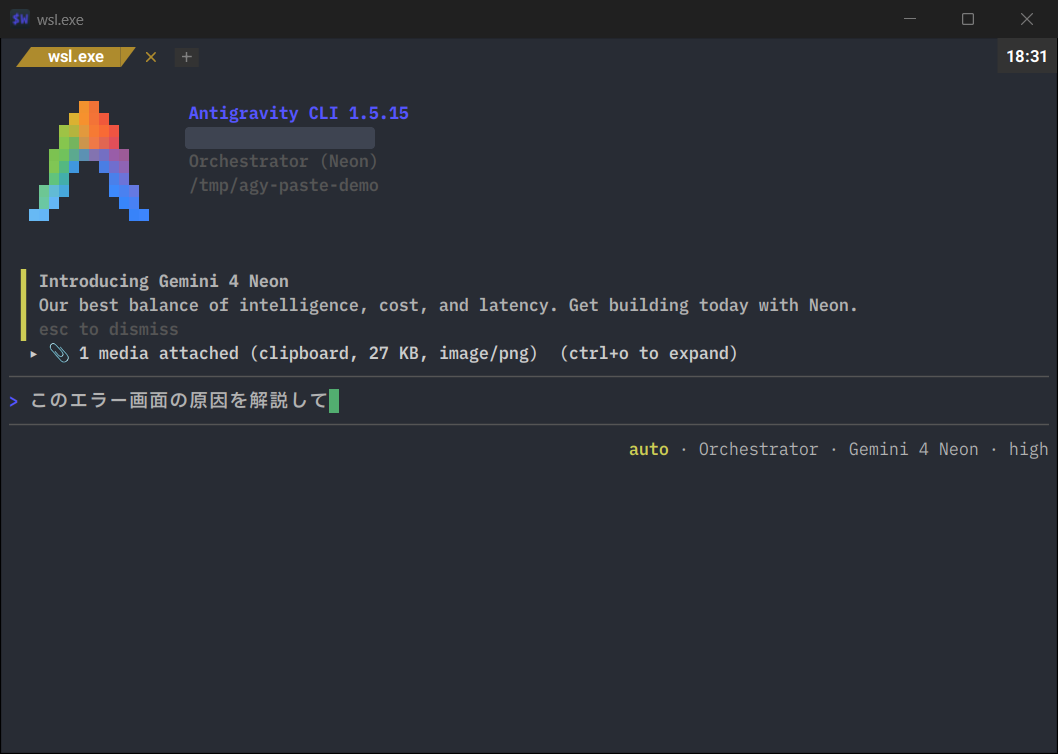
1 media attached と image/png が表示されました。2026年11月23日に試したとき、PowerShell版のコマンド単体では、1917 × 1026の画像で wl-paste --list-types に3.284秒、wl-paste --type image/png | file - に3.272秒かかりました。C#ヘルパーに切り替えたときは760 × 260のサンプル画像を使い、前者が初回0.226秒、2回目0.087秒、後者が0.100秒でした。貼り付けをやり直すと、PowerShell版でエラーが出た操作で、C#版では入力欄にPNGが付きました。
テキストを貼るときは、これまでどおりWezTerm側の Ctrl+Shift+V(PasteFrom("Clipboard"))を使います。スクリーンショットを渡すときだけ、上の起動コマンドと Ctrl+V を使う形です。元の状態に戻すときは、agy を終了して通常どおり agy だけで起動します。専用ファイルを片付けるなら、WSL2側のラッパーとWindows側の win-wl-paste.exe を取り除けば十分です。導入時に退避したファイルがあれば、元の場所に戻せます。
コメント